Tag: Moderation

  • 9.0.0 โ€” Growing Up

    Major versions are the right moment to fix things properly instead of patching around them. In ActivityPub plugin 9.0.0, unpublishing a federated post sends a real Delete instead of a placeholder text, and federation can be tuned down so it doesn’t overwhelm smaller servers. The ActivityPub API moves closer to the W3C standard, and your blog can now be featured in Starter Kits, if you allow it.

    Starter Kits, With Your Consent

    Starter Kits are curated lists of accounts, bundled so that others can discover and follow them in one go. You may know the idea as Starter Packs from Bluesky, and Mastodon is rolling out its own version called Collections with version 4.6. The name varies, the idea is the same: someone who knows a topic well puts together a list of accounts worth following, and shares it.

    For blogs, discovery is the hard part of the Fediverse. A blog doesn’t post twenty times a day, so it rarely surfaces in busy timelines on its own. Being part of a Starter Kit changes that: when someone shares a “great photography blogs” kit, every person who opens it sees your blog, and following is one tap away.
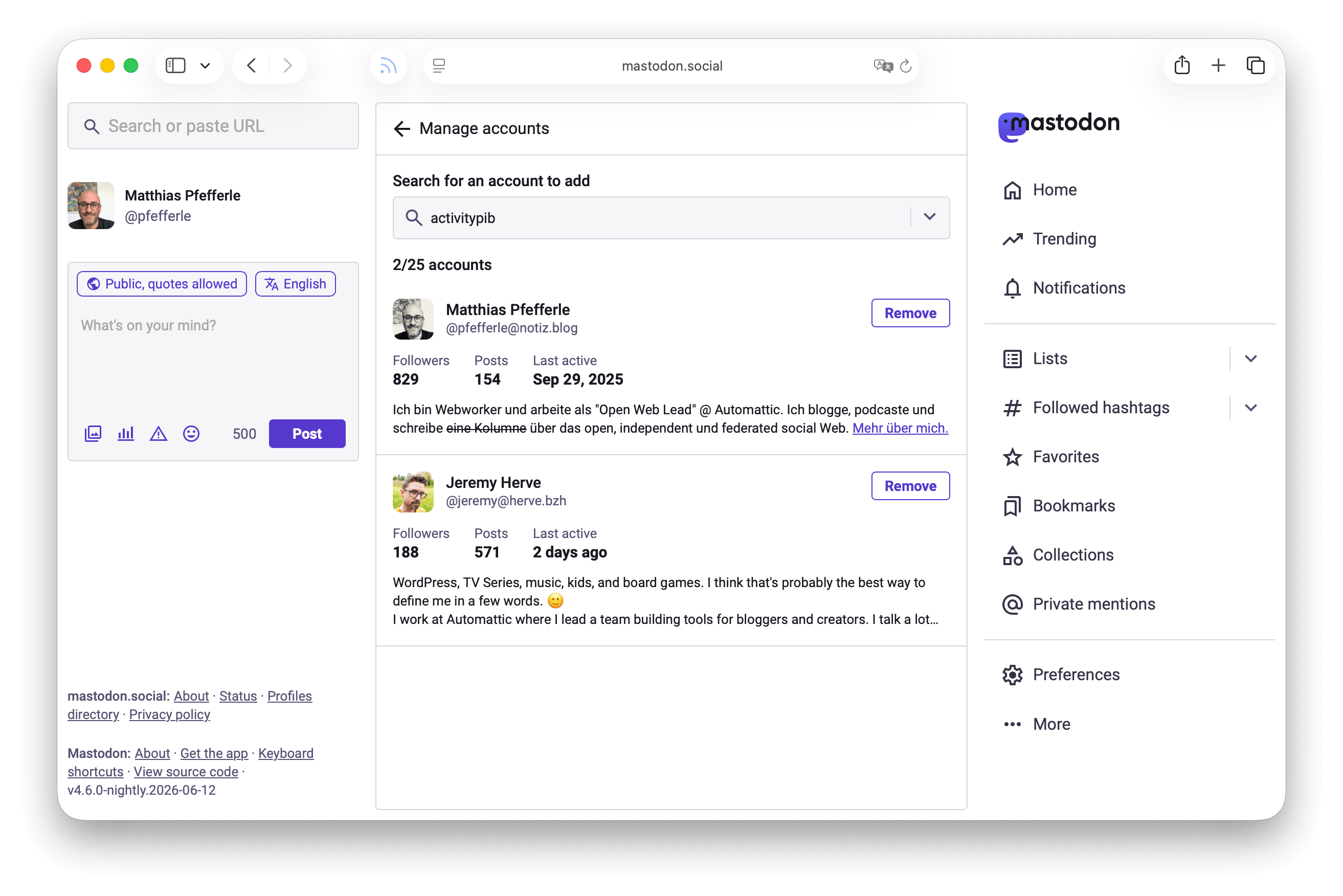
    Screenshot of a Featured-Collection, showing two WordPress blogs, on Mastodon.

    One piece was missing, though: other people couldn’t add your WordPress blog to their lists, because your site never told their server who is allowed to do that. ActivityPub 9.0.0 fixes this with the new Default Starter Kit policy setting: Anyone, Followers only, or Just me. The default is “Just me”, so nothing changes unless you say so. If you want the reach, set it to “Anyone” under Settings โ†’ ActivityPub โ†’ Activities. Under the hood, this announces a canFeature policy on your profile, based on a new Fediverse Enhancement Proposal (FEP-7aa9) that is not published yet; we’ll link it here once it is.

    The Mastodon team explains the thinking behind Collections in their design post, and Fedi.Tips has a guide to Mastodon’s Lists feature, the private cousin of Collections. And since ActivityPub 8.1.0 you can import Starter Kits into WordPress under Tools โ†’ Import, so it works in both directions.

    Blurred Previews for Your Photos

    Photos are heavy. While they load, most Fediverse apps show an empty gray box.

    The plugin now generates a BlurHash for every image: a tiny, blurred color preview that other Fediverse apps can show while the real photo loads. Your followers see a soft impression of the picture instead of an empty rectangle. The BlurHash website has a nice interactive demo.

    The plugin uses the same blurhash property that Mastodon documents as part of its ActivityPub extensions, so your previews work wherever Mastodon’s do. Everything happens automatically in the background; there’s nothing to configure.

    From Placeholder to Delete

    Until now, when you moved a federated post back to draft or made it private, the plugin sent an Update with a placeholder text: “(This post is being modified)”. Your followers kept a copy that claimed the post was being edited, even if it never came back. That was a workaround, and a bad one: it misrepresented your content and left stale placeholders sitting in timelines across the Fediverse.

    ActivityPub 9.0.0 replaces the workaround with the behavior the Fediverse expects. When a federated post moves to draft, pending, private, trash, or gets a password, the plugin now sends a Delete to your followers, so their servers remove their copies. Your site keeps a Tombstone in place of the post, as described in FEP-4f05, so it can announce the post again if you re-publish it.

    Be aware: even unpublishing a post only temporarily might delete it forever on other servers. When you take a post down on purpose, that’s what you want. But if you plan to come back, know that whether the post comes back with you depends on the receiving server, and the boosts, favorites, and replies on the old copies are gone either way. Discourse and NodeBB restore posts like this; Mastodon currently does not, though there’s an open issue we hope to see land soon. For now, treat unpublishing as deleting, even if you plan to publish again.
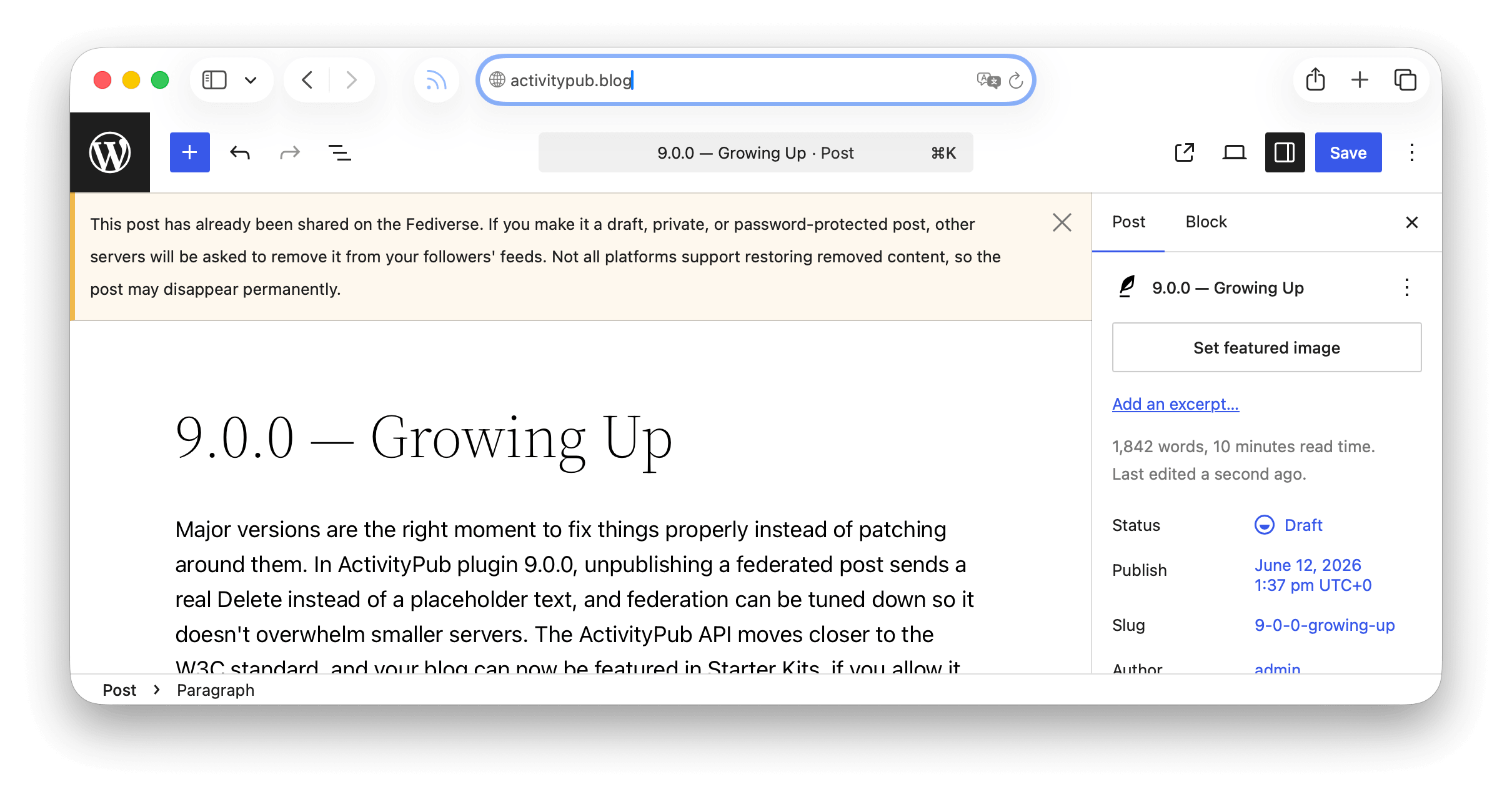
    Screenshot of the Soft-Delete warning in the Block-Editor.

    That’s why the editor now warns you before you make a federated post a draft, private, or password-protected. The dialog tells you that followers’ copies will be removed, so you know what will happen before you save.

    Federation That Doesn’t Overwhelm Your Server

    Federation is real work. When you publish a post, the plugin sends it to every follower’s server, and each delivery is a signed HTTP request processed in the background. On a well-provisioned server, no problem. On shared hosting with a few thousand followers, that burst of background work can slow your whole site down, right at the moment your new post brings visitors in.

    The new Distribution Mode setting exists so the plugin stays a good guest on the server it runs on. It comes with three presets:

    • Default: the current behavior, as fast as possible (100 deliveries per batch, 15 seconds pause).
    • Balanced: a moderate pace (50 per batch, 30 seconds pause).
    • Eco Mode: gentle on server resources, made for shared hosting (20 per batch, 30 seconds pause).

    Nothing changes unless you need it to: Default behaves exactly like before. But if your site gets sluggish after publishing, switch to Balanced or Eco Mode under the Advanced tab of the ActivityPub settings. Your followers get the post a few minutes later, and your server keeps breathing. A Custom mode with your own batch size and pause is there for fine-tuning.

    The Advanced tab is hidden by default. To enable it, open the ActivityPub settings page, click Screen Options in the top right corner, check Advanced Settings, and save.

    Hosting providers can pin a preset across all their sites with the ACTIVITYPUB_DISTRIBUTION_MODE constant, so a whole fleet of sites stays well-behaved without anyone touching a setting.

    Speaking Standard ActivityPub

    The ActivityPub API (the plugin’s Client-to-Server implementation) keeps converging on what the W3C SWICG is standardizing. Clients can now request the canonical SWICG scope names like activitypub:read:all and activitypub:write:all, and the OAuth discovery metadata advertises them. Token responses include activitypub_actor_id, following the SWICG ActivityPub API Basic Profile, and rate-limit responses now carry a Retry-After header so clients know how long to wait.

    None of this changes anything for existing apps. It just means new apps can connect to your site by following the standard, not our documentation.

    Since this is a major version, there’s one heads-up for developers: we removed functions, methods, and the Follower class that were deprecated in versions 7.0 through 7.4. Everything removed has had a documented replacement for over a year, but if your plugin or theme builds on ActivityPub internals, check the changelog before updating.

    A Good Reason to Update Soon

    Beyond the features, 9.0.0 includes a series of security hardening fixes that keep private data private and tighten how the plugin verifies who is allowed to change what. None of them need anything from you beyond updating, which is exactly why you should update soon. The details are in the changelog below.

    Changelog

    Added

    • Add a Distribution Mode setting to control how quickly posts are delivered to followers.
    • Add an opt-in setting to consent to inclusion in Starter Kits (also called Starter Packs or Featured Collections). Off by default. Find it under Settings, ActivityPub, Activities.
    • C2S clients can now request canonical SWICG ActivityPub API scope names such as activitypub:read:all and activitypub:write:all, and the OAuth discovery metadata advertises them.
    • C2S token responses now include activitypub_actor_id so clients following the SWICG ActivityPub API Basic Profile can discover the authenticated actor.
    • Generate a blurred color preview (blurhash) for images so other fediverse apps can show a placeholder while your photos load.
    • Quote notification emails now include a link to the post that quoted you, so you can review and respond more quickly.
    • Warn in the editor before making a post that’s already shared on the Fediverse a draft, private, or password-protected, since followers’ copies will be removed.

    Changed

    • Add the blurhash term to the outbound JSON-LD @context so attachments that include a blurhash property are strictly correct JSON-LD, matching Mastodon’s own context shape.
    • Federated posts moved to draft, pending, private, trash, or password-protected now send a Delete to followers (previously sent a placeholder “editing” Update or were silent).
    • OAuth rate-limit responses now include a Retry-After header so clients know how long to wait before retrying.
    • Updated a build dependency to a clean release now that a fixed version is available.

    Removed

    • Removed functions, methods, and the Follower class that were deprecated in versions 7.0 through 7.4.

    Fixed

    • Fix a fatal error when receiving a new follower while the Stream plugin is active.
    • Fix a follow request being marked as accepted when the confirmation came from a different account than the one being followed.
    • Fix the Fediverse settings appearing twice and visibility changes not saving in the block editor when the Classic Editor plugin is also active.
    • Fix the introduction video failing to load on the Getting Started help screen.
    • Follower synchronization with Mastodon no longer fails, signed requests with query strings now verify correctly.
    • Harden the Blurhash encoder: skip decompression-bomb images before decoding, flatten transparency onto white so transparent logos no longer produce near-black placeholders, and defer the cron encode until attachment metadata is saved.
    • Images and videos placed in a Media & Text block are now included when a post is shared to the Fediverse.
    • Requests from other platforms to feature your posts are now handled correctly instead of being ignored.
    • RSS and Atom feeds now show a simple @username mention in place of the reply block’s full embed card, which only renders properly when the plugin’s frontend CSS is loaded.
    • Stop a deprecation notice from appearing in the error log when the NodeInfo plugin is also active.

    Security

    • Enforce the signing-key host check on incoming federated activities regardless of how the key identifier is formatted.
    • Fix the real-time activity stream so it only returns the requesting user’s own activities.
    • Harden the Site Health connectivity check so it cannot be used to reach unsafe network addresses.
    • Only share comment replies in the Fediverse when the post they belong to is itself federated, so replies on private or non-federated posts stay private.
    • Prevent a remote server from discovering which of your followers belong to a third-party server it does not control.
    • Prevent logged-in users from viewing another user’s private outbox activities.
    • Prevent remote servers from modifying or deleting federated profiles, posts, and interactions they do not own.
    • Rate-limit the remote-follow lookup to prevent it from being abused to trigger outbound requests.
    • Stop the OAuth token introspection endpoint from revealing another user’s token details to logged-in users.
    • Stop the quote-authorization stamp from exposing a post’s other metadata.

    Get It

    Download from WordPress.org or grab it on GitHub.

    A huge thank you to everyone who contributed code, testing, bug reports, and ideas to this release. Special thanks to .

    Update, and let us know what you think: will you open your blog up for Starter Kits? And does the new delete behavior match what you expected your site to do all along?

  • 7.8.0 – Happy Holidays

    7.8.0 – Happy Holidays

    As the year winds down, weโ€™ve wrapped up a release that brings better moderation tools, a new way to display reactions, and a small surprise, just in time for the holidays.

    Stronger Tools for Moderation

    Moderation can be hard work, especially on the Fediverse, where conversations flow in from all directions. This release introduces new tools that help you stay in control with less manual effort.

    You can now subscribe to shared blocklists and let the plugin keep them up to date automatically. Subscribed lists are synced on a weekly cadence, so changes made upstream are reflected on your site without you having to lift a finger.

    A screenshot of the block list subscription feature.

    On top of that, weโ€™ve added a bulk domain blocklist importer. You can upload a CSV or plain text file, including Mastodon-style exports, and quickly add large numbers of domains at once. To make it even easier to get started, the importer includes a one-click option for the popular community-maintained IFTAS DNI list (@about.iftas.org).

    A screenshot of the block list importer feature.

    Together, these features make moderation more scalable and less stressful, so you can spend more time engaging and less time firefighting.

    Reactions, Your Way

    Reactions are a big part of how conversations feel alive on the Fediverse, and now you have more control over how they appear on your site.

    The Fediverse Reactions block gained a new Summary display style. Instead of showing a facepile of avatars, this option presents reactions as clean, inline counters for comments, likes, boosts, and replies. Itโ€™s a great fit for minimal layouts, feeds, or sites where avatars are disabled.

    A screenshot of the compact reactions.

    You can switch between the classic facepile and the new summary style directly in the block settings. And if avatars are turned off in discussion settings, the block automatically falls back to the summary view.

    A Sneak Peek at the Reader (Experimental)

    One more thing, for the curious among you, there’s now an early preview of the ActivityPub Reader, hidden behind a feature flag in the Advanced settings tab. If you don’t see it yet, open Screen Options at the top right of the ActivityPub settings page, check “Advanced Settings,” and save. That reveals the Advanced tab where you can enable the Reader.

    A screenshot of the reader implementation.

    When enabled, this adds a new โ€œSocial Webโ€ submenu to your Dashboard menu item. An place where you can read posts and shares from accounts you follow, turning your WordPress admin into a lightweight Fediverse reader.

    Because this is still very much a work in progress, the Reader is disabled by default and clearly marked as experimental. The UI, behavior, and feature set will change significantly in future releases as we explore what a great native Fediverse reading experience inside WordPress could look like.

    If you enjoy testing new ideas, weโ€™d love to hear your feedback, whether itโ€™s bug reports, rough edges youโ€™ve noticed, or ideas about what this Reader should become. Early input helps shape where this goes next, so feel free to share your thoughts in whatever form works best for you.

    Changelog

    Added

    • Add blocklist subscriptions for automatic weekly synchronization of remote blocklists.
    • Add compact display style to Reactions block that hides avatars.
    • Add domain blocklist importer for bulk importing blocked domains.
    • Add image optimization for imported attachments (resize to 1200px max, convert to WebP).
    • Add local caching for remote actor avatars.
    • Add relay mode to forward public activities to all followers.
    • Add scheduled cleanup for remote posts, preserving posts with local user interactions.
    • Add site health check to warn when DISABLE_WP_CRON may impact ActivityPub functionality.
    • Add Social Web Reader for browsing ActivityPub content directly in WordPress admin.
    • Delete remote posts on plugin uninstall.
    • Mastodon importer now imports self-replies as comments, preserving thread structure.

    Changed

    • Cache expensive operations in Post transformer to improve performance.
    • Improve performance and reliability of @-mention detection.
    • Reduce federated content size by removing unnecessary HTML attributes.
    • Skip downloading video and audio attachments, embedding remote URLs directly to avoid storage limits.
    • Use stable term_id-based IDs for Term transformer to ensure federation consistency.
    • Wrap blocked domains and keywords tables in collapsible details element.

    Fixed

    • Respect WordPress “show avatars” setting for remote actor avatars.
    • Ensure NodeInfo accurately represents site administrators to the Fediverse.
    • Fediverse Followers block now works correctly when the “Hide Social Graph” privacy option is enabled.
    • Fix NodeInfo documents to comply with schema specification.
    • Follow Me block button-only style now respects width settings from the inner Button block.
    • Preserve whitespace inside preformatted elements when federating content.

    Downloads

    Holiday Thanks

    A special thank-you to everyone who joined us during the recent office hours โ€” for the questions, the thoughtful feedback, and the great conversations about where ActivityPub for WordPress should go next. Talking directly with you helps shape these releases more than any roadmap ever could.

    See you in 2026 โ€” and happy holidays!

  • Help Shape the Future of Moderation in the Fediverse

    Running a community in the Fediverse means balancing openness with safety. Every year, @iftas takes the pulse of administrators, moderators, and community managers with their Annual Needs Assessment. This survey helps identify whatโ€™s working, where support is needed, and which tools can make a difference for those keeping decentralized spaces safe.

    The 2025 survey is now open

    Take part in the IFTAS Needs Assessment (5โ€“10 minutes).

    (If you havenโ€™t seen them before, you can also take a look at last yearโ€™s report)

    Last yearโ€™s responses represented moderators of over 4.3 million accounts across ActivityPub platforms. With WordPress now the largest group of federating instances, itโ€™s especially important for our community of hosts, site admins, and moderators to be heard.

    Moderation in WordPress: From Site-Wide to Personal Controls

    We recently introduced a major update to the ActivityPub plugin for WordPress: personalized and site-wide moderation tools.

    • Site administrators can now set domain, keyword, and actor-level blocks that protect the entire site.
    • Individual users can fine-tune their own experience with personal blocks, managed directly from their profiles.
    • Content is checked against both global and personal rulesโ€”so moderation works at every level.

    These improvements directly address needs raised in previous IFTAS surveys, making moderation more discoverable, flexible, and effective for WordPress communities in the Fediverse.

    Your Input Matters

    IFTAS uses the Needs Assessment to guide tools, policies, and advocacy that reflect the real-world challenges of moderatorsโ€”especially those in under-resourced communities. The more representative the responses, the stronger the outcomes for everyone.

    If youโ€™re running a federating WordPress site, please consider:

    1. Filling out the survey yourself.
    2. Sharing it with other admins, moderators, and community organizers.
    3. Reminding folks that itโ€™s anonymous, quick, and impactful.

    Together, we can keep building a safer, healthier Fediverseโ€”one that reflects the needs of its communities.

  • 7.3.0 โ€“ Ctrl+Fed+Delete

    A cute Wapuu astronaut inside a futuristic space station, sitting at a glowing control desk with holographic message icons floating in front of them. Some messages have a green checkmark for approval, others a red X or trash bin icon for deletion. The Wapuu looks focused, managing which messages can enter from the Fediverse and which should be removed. The background shows the curved windows of the space station with stars and a planet outside, blending sci-fi tech with Wapuuโ€™s cartoon charm.

    Ready for a smoother ride on the Fediverse? ActivityPub for WordPress 7.3.0 is here to make your experience friendlier and more flexible than ever. Whether youโ€™re keeping out unwanted guests, bringing stray conversations home, or just tidying up your digital footprint, this release puts powerful new tools right at your fingertips. Letโ€™s take a look at whatโ€™s new!

    Personalized & Site-Wide Moderation

    With this release, Moderation tools are easier to discover and manage, thanks to a revamped two-tiered system that empowers both site admins and individual users with greater control over their Fediverse experience.

    Now, site administrators can set up site-wide blocksโ€”covering domains, keywords, and even specific actorsโ€”right from the Settings screen or the new Blocked Actors table. These tools work together to keep out unwanted content and spammy actors for everyone on your site.

    But we didnโ€™t stop there! Every user can fine-tune their own experience. Head to your Profile to add personal domain and keyword blocks, or visit the new Blocked Actors submenu under Users to manage who can interact with you. Blocking someone is easier than everโ€”just paste their profile ID or webfinger, or use the handy new โ€œBlockโ€ link right from your Followers list.

    • Followers table in WordPress with options to delete, block, or follow back ActivityPub followers.
    • Confirmation screen in WordPress for blocking an ActivityPub account, including options for site-wide blocking.
    • Followers page in WordPress showing an empty list and a notification that an account has been blocked.

    Whenever new ActivityPub content comes in, the plugin checks it against both global and personal blocks. Domains are matched not just to the sender, but also to the activity and object IDs. Keywords are scanned throughout the content, summaries, and even actor names. Site-wide rules always run first, followed by your personal settingsโ€”so youโ€™re protected at every level. (For the blog actor, only site-wide blocks apply.)

    For backwards compatibility, the classic comment disallow list is still supported, ensuring your existing moderation rules continue to work seamlessly.

    Saying Goodbye, the Right Way

    Sometimes, a clean break is necessary. Whether youโ€™re retiring a blog, removing a user, or handling old content, this release makes sure your presence in the Fediverse can be removed gracefully and consistently.

    Weโ€™ve added a self-destruct feature for sites that want to step away entirely. With a single CLI command (wp activitypub self_destruct), WordPress will send out Delete activities to all followers. Built-in progress tracking and admin notifications let you know when the process has finished, so you can be sure your Fediverse footprint is fully cleared.

    User deletion is now handled with the same care. When a user is removed from WordPress, a corresponding Delete activity is sent to their followers, ensuring that connections across the network are properly closed.

    Bring the Conversation to You

    Sometimes a reply you care about doesnโ€™t make it all the way to your Inbox. Maybe it was posted on a remote server with finicky delivery, or slipped past the usual flow of ActivityPub. With this release, you donโ€™t have to miss out.

    Now you can search for any remote URL directly. If the comment is already in your database, youโ€™ll be taken straight to the matching comment thread on your blog post. If not, the plugin will fetch and import the remote reply to that post, so you can fold scattered conversations back into your site seamlessly.

    This means youโ€™re no longer limited to what arrives automatically. If youโ€™ve got a link to a discussion happening elsewhere in the Fediverse, you can pull it right into your own comment threads and keep the context intact.

    A Persistent Inbox for Better Debugging

    Fediverse interactions can get complex, and sometimes you need deeper insight into whatโ€™s really happening under the hood. Thatโ€™s where the new persistent inbox comes in.

    When enabled in Advanced Settings, the plugin now logs all incoming Create or Update activities. Instead of vanishing once processed, these entries are collected in a dedicated Inbox Collectionโ€”giving you a complete trail to reference when debugging.

    Full Changelog

    Added

    • Add actor blocking functionality with list table interface for managing blocked users and site-wide blocks.
    • Add code coverage reporting to GitHub Actions PHPUnit workflow with dedicated coverage job using Xdebug.
    • Add comprehensive blocking and moderation system for ActivityPub with user-specific and site-wide controls for actors, domains, and keywords.
    • Add comprehensive unit tests for Followers and Following table classes with proper ActivityPub icon object handling.
    • Added link and explanation for the existing Starter Kit importer on the help tab of the Following pages.
    • Adds a self-destruct feature to remove a blog from the Fediverse by sending Delete activities to followers.
    • Adds a User Interface to select accounts during Starter Kit import.
    • Adds support for importing Starter Kits from a link (URL).
    • Adds support for searching (remote) URLs similar to Mastodon, redirecting to existing replies or importing them if missing.
    • Adds support for sending Delete activities when a user is removed.
    • Adds support for Starter Kit collections in the ActivityPub API.
    • A global Inbox handler and persistence layer to log incoming Create and Update requests for debugging and verifying Activity handling.
    • Follower lists now include the option to block individual accounts.
    • Improved handling of deleted content with a new unified system for better tracking and compatibility.
    • Moderation now checks blocked keywords across all language variants of the content, summary and name fields.
    • When activated or deactivated network-wide, the plugin now refreshes rewrite rules across all sites.

    Changed

    • Add default avatars for actors without icons in admin tables.
    • Added support for list of Actor IDs in Starter Kits.
    • Improve Following class documentation and optimize count methods for better performance.
    • Refactor actor blocking with unified API for better maintainability.

    Fixed

    • Blocks relying on user selectors no longer error due to a race condition when fetching users.
    • Fix duplicate HTML IDs and missing form labels in modal blocks.
    • Fix malformed ActivityPub handles for users with email-based logins (e.g., from Site Kit Google authentication).
    • Fix PHP 8.4 deprecation warnings by preventing null values from being passed to WordPress core functions.
    • Improves handling of author URLs by converting them to a proper format.
    • Improves REST responses by skipping invalid actors in Followers and Following controllers.
    • More reliable Actor checks during the follow process.
    • Prevents Application users from being followed.
    • Proper implementation of FEP 844e.
    • Switches ActivityPub summaries to plain text for better compatibility.

    Downloads

    Thank you!

    Big thanks to everyone who contributed code, shared feedback, tested, or encouraged us along the way! Together, weโ€™re making the fediverse more connectedโ€”one release at a time. โค๏ธ

    Weโ€™ve just rolled out version 7.3.0โ€”try it out and let us know what you think!

  • Your Site, Your Rules: Filtering Fediverse Activity

    When running a WordPress site with the ActivityPub plugin, you’re not just managing a websiteโ€”you’re also operating a node in the Fediverse. This means you need effective tools to block unwanted activities, users, servers, and content from other instances across the network.

    How Blocking Works in ActivityPub for WordPress

    The ActivityPub plugin takes a pragmatic approach to blocking unwanted content by building on WordPressโ€™s existing โ€œDisallowed Comment Keysโ€ feature. While this leverages familiar comment filtering tools, it may be less immediately obvious than the dedicated blocking interfaces found in some other Fediverse applications.

    The Disallowed Comment Keys System

    At its core, WordPress has long had a built-in system to filter comments based on specific keywords or domains. The ActivityPub plugin builds on this system to also block incoming Fediverse activities.

    When an activity arrives at your WordPress site’s inbox, the plugin runs it through the same filtering mechanism used for regular WordPress comments. This means that if you’ve configured WordPress to block certain domains or keywords in comments, those same rules will apply to incoming ActivityPub activities like follows, likes, or replies.

    Where to Find and Configure Blocking Settings

    The blocking settings aren’t located within the ActivityPub plugin’s own settings page. Instead, they’re accessed through WordPress’s standard Discussion Settings:

    1. Navigate to Settings โ†’ Discussion in your WordPress admin panel.
    2. Scroll down to the Disallowed Comment Keys section.
    3. Add domains, keywords, or IP addresses you want to block, one per line.

    For example, to block a problematic Fediverse server, you would add its domain (like bad-instance.com) to the disallowed comment keys list.

    The ActivityPub settings page also links to this under Settings โ†’ ActivityPub โ†’ Settings tab, where the “Blocklist” section points you to the same Disallowed Comment Keys setting.

    Tracking Blocked Activities

    When the plugin blocks an incoming activity, it logs relevant details to your PHP error logs. This typically includes information about the actor (user) who sent the activity, helping you monitor and refine your blocking strategy over time.

    Best Practices for Blocking

    When managing your WordPress site as a Fediverse node:

    1. Be specific: Block particular profiles or domains instead of using broad keyword filters. Precision helps avoid false positives.
    2. Review your logs: Periodically check your PHP error logs to understand whatโ€™s being blocked.
    3. Adjust as needed: Refine your blocking strategy based on the patterns you observe.

    Unlike centralized social networks, the Fediverse gives you direct control over what appears on your site. Your blocklist is a reflection of your site’s values and the kind of interactions you want to support.

    Fediverse Reactions