Tag: Blocks

  • 9.4.0 — Picture This

    Someone replies to your post from Mastodon with a photo. Until now, your blog showed the text and dropped the photo. With 9.4.0 that can change.

    This release is mostly about what you and your visitors see: images in replies, quotes, and your blog profile. It also contains another round of security fixes, so please update.

    Images in Replies

    There is a new option in the ActivityPub settings: Show images attached to replies. When you turn it on, images in replies from the Fediverse show up below the comment text. Image descriptions come along, so the images stay accessible. Replies that are only an image, with no text, are accepted too.
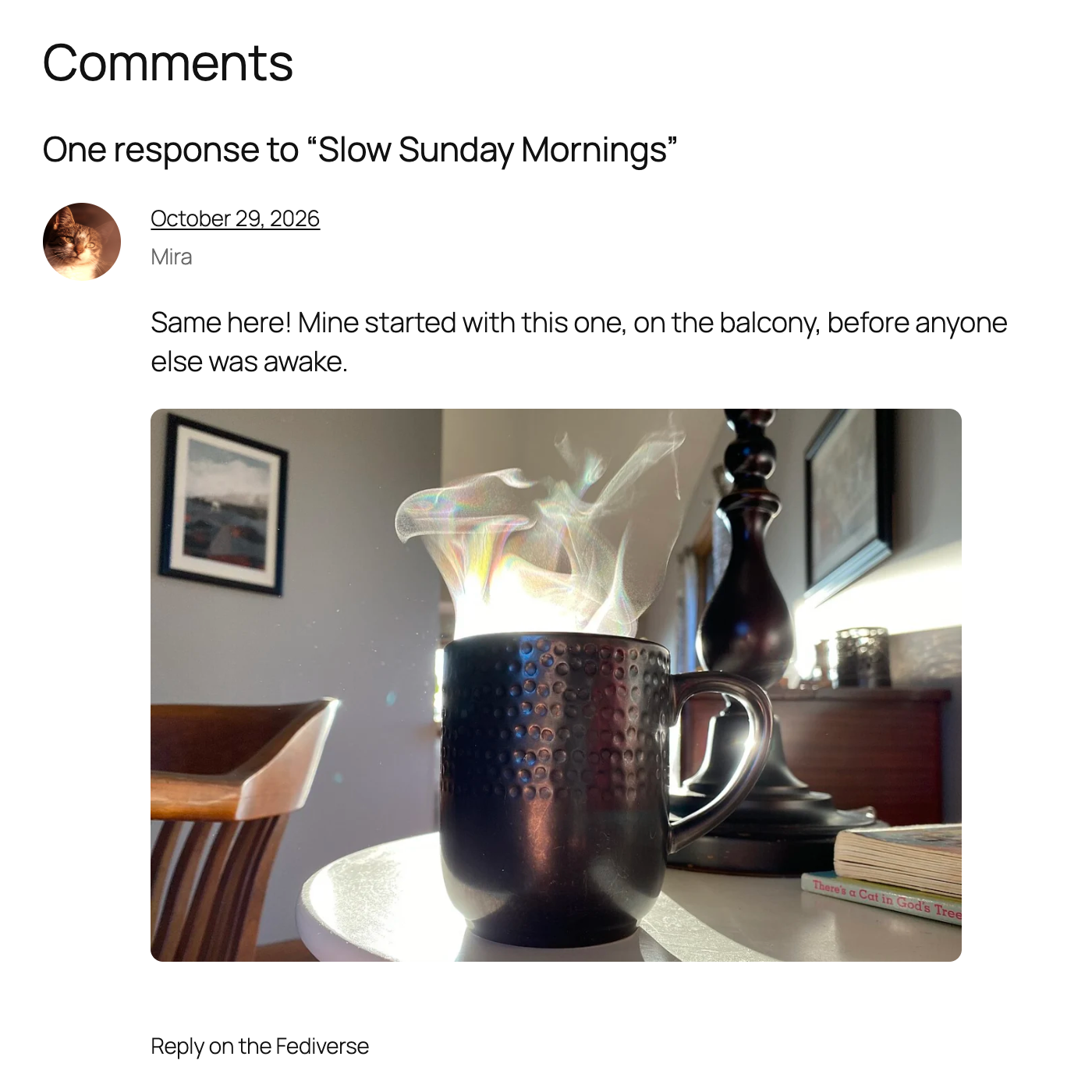
    A Fediverse reply in the comment section, with the photo of a steaming coffee mug shown below the comment text.

    The images are cached on your own server, so your visitors never load them from the other server. Up to three images per reply are shown. Images only appear on approved comments. Pending, spam and trashed comments show only their text, and their images are never downloaded.

    The option is off by default. WordPress itself does not show images in comments, so this changes how your comment section looks, and we did not want to do that without asking. One thing to keep in mind: if your site approves comments automatically, images from other servers become visible without anyone looking at them first.

    If you turn the option off again, the images disappear and the descriptions show as text. Turn it back on and they come back.

    Quote Posts From the Fediverse

    Since 7.7.0, your site can receive quotes. Now it can quote, too.

    The new Federated Quote block works like the Reply block. Paste the link of a Fediverse post, and the block embeds it in your post. When you publish, your site asks the author of the quoted post for permission. If they agree, your quote is marked as verified on their server. If they decline, your post stays, but the quote turns into a plain link.
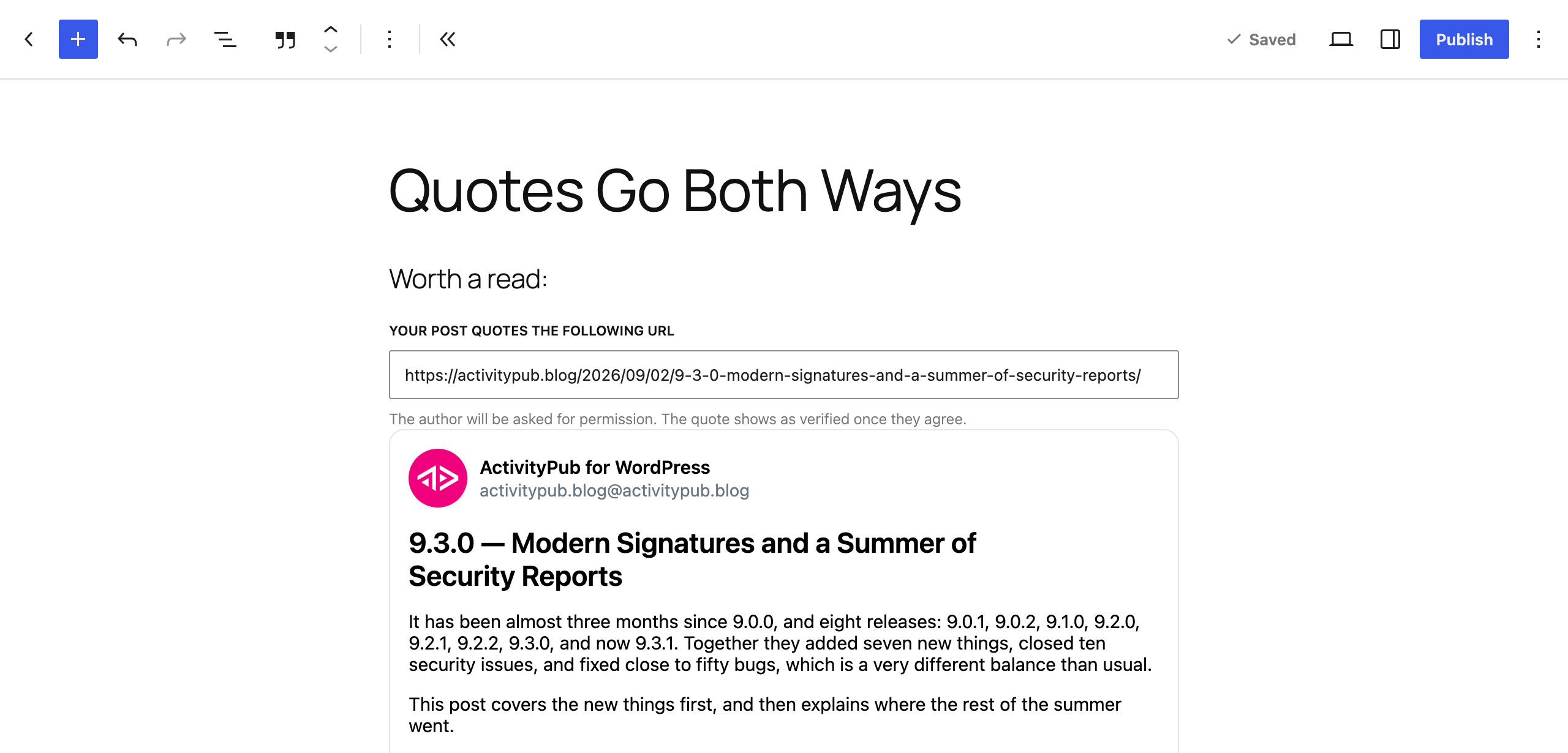
    The Federated Quote block in the editor, with the URL of the quoted post, a note that the author will be asked for permission, and an embed of the post.

    The editor shows where the request stands, approved or declined. It also warns you if the author does not allow quotes at all. You can still publish in that case, but the author will probably say no.

    There is also a quote bookmarklet on the Tools screen, next to the reply one. Click it on any Fediverse post and you get a new draft with the Quote block already in place.

    This depends on the other server. Mastodon supports the permission request since version 4.5. Other software might not answer yet, and then your quote stays unverified.

    On the receiving side, the Comments screen has a new Source column. It links incoming replies and quote posts to the post they came from.

    A Name and Face for Your Blog Profile

    Until now, your blog profile on the Fediverse used your site title as its name and your site icon as its avatar. You can now give it its own. Under Settings → ActivityPub → Blog Profile there is a new name field and an avatar picker. If you leave them empty, nothing changes, and the site title and site icon are used as before.
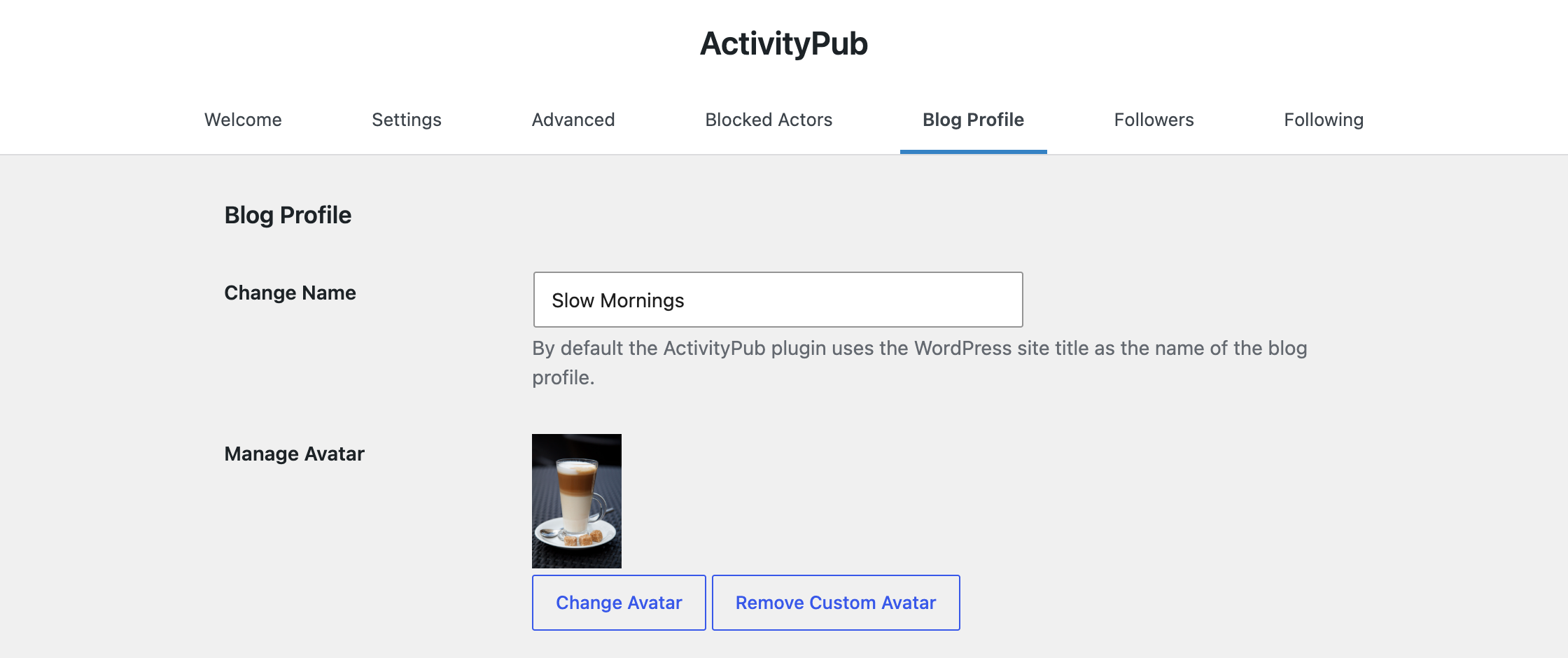
    The Blog Profile settings with the new name field set to "Slow Mornings" and a custom avatar.

    Security, Again

    As in 9.3.0, this release fixes vulnerabilities that were reported to us.

    • Signed requests are checked more strictly. They have to be addressed to your site, and signing keys from other servers are verified more carefully.
    • Blocks are respected everywhere. Accounts you blocked can no longer reply to, like, repost or quote your posts and comments, and only the sender of a reply or like can change or remove it.
    • Content from other servers is handled more safely when it is imported as posts or comments.
    • Apps you connect can only do what you allowed them to do, and only on content the connected user is allowed to change.

    If you run the plugin, please update.

    Smaller Things You Might Notice

    • More languages. Posts are federated with the language Polylang assigned, and posts from Mastodon apps keep the language the app set. Handles like @renée@café.example now work in mentions and search.
    • Blocks that fit your theme. The Followers and Following blocks take their colors and font from your theme, and the Reactions block has a new Counts style that can replace the comments link in a query loop.
    • Your uploads folder stops growing. Profile pictures were downloaded again on every page view, leaving a copy behind each time. The update removes the extra copies.
    • Fewer duplicate emails when another server delivers the same message twice, or when a reply also mentions you.
    • Comments: replies are no longer auto-approved because the account liked a post before, likes and reposts no longer leak into comment lists, and comment links open the right page.
    • What your followers get: no extra image under your posts, summaries that stop at the “Read more” tag, podcast files from outside your media library, and account moves that are verified and reach your followers.
    • Apps and the ActivityPub API: mentions from Mastodon apps are federated again, and replies to posts on other servers are delivered.
    • Compatibility: fixes for WordPress 7.1 and 7.2, PHP 8.5, Polylang, and sites behind a proxy.
    • Under the hood: remote content is cached through the object cache, and endpoints that other servers call now have a rate limit.

    The full changelog is in the GitHub repository.

    Get It

    Download from WordPress.org or grab it on GitHub. If your site updates automatically, you already have it.

    Turn on images in replies, try quoting a post, and let us know how it looks on your site. Which servers answer your quote requests, and which ones stay silent?

    Thank You

    A huge thank you to everyone who contributed code, tested early builds, filed bug reports, or reported a security issue for this release.

  • 7.7.0 — Extra Quotable

    7.7.0 — Extra Quotable

    Right on the heels of WordPress 6.9 we released a new version of the ActivityPub plugin, making quote comments visible in the Reactions block and bringing you new ways of customizing your author pages.

    Quotes Join the Reactions Party

    When someone quotes your post on Mastodon or other Fediverse platforms, you’ll now see it right alongside your likes and reposts. Quotes get their own row in the Fediverse Reactions display, making it easy to see at a glance who’s building on your ideas and adding their own commentary.

    Behind the scenes, we improved how we’re detecting quotes. Different platforms have their own ways of handling quote posts, and not all of them speak the same language. The plugin now understands these variations better, so whether someone quotes you from Mastodon, Misskey, or elsewhere, it just works.

    This means your engagement stats tell a fuller story. A quote isn’t just a repost—it’s someone adding their voice to yours, and now WordPress can recognize and display that distinction.

    Show Off Your Fediverse Identity

    If you’ve set up extra fields on your Fediverse profile—things like your website, pronouns, location, or links to other accounts—you can now display them directly on your WordPress site with the new Extra Fields block.

    • Fediverse Extra Fields block using the cards style, showing two profile fields displayed as separate bordered cards: 'Powered by' with value 'WordPress' and 'Blog' with a clickable URL, stacked vertically below the author profile header.
    • Fediverse Extra Fields block using the default list style, showing profile fields in a compact table layout with labels on the left and values on the right: 'Powered by: WordPress' and 'Blog:' with a clickable URL.
    • Fediverse Extra Fields block using the stacked style, showing profile fields with labels above their values: 'Powered by' above 'WordPress' and 'Blog' above a clickable URL, arranged vertically below the author profile header.

    Drop it onto any page, post, or your author archive template, pick a style that fits your theme, and your profile details appear right where your visitors can see them. Choose from a clean table layout, a stacked list, or styled cards. You can also control how many fields to show and customize colors to match your site.

    Changelog

    Added

    • Add documentation guide for using ActivityPub blocks in classic themes with Block Template Parts
    • Added a new Fediverse Extra Fields block to display ActivityPub extra fields, featuring compact, stacked, and card layouts with flexible user selection options.
    • Added support for quote comments, improving detection and handling of quoted replies and links in post interactions.
    • Add notifications for boosts, likes, and new followers in Mastodon apps via the Enable Mastodon Apps plugin
    • Adds support for turning tags, categories, and custom taxonomies into federated collections in the Reader view so you can browse and follow topics more seamlessly.
    • Prevent email notifications for comments on ActivityPub custom post types.
    • Send a Reject activity when a quote comment is deleted, revoking previous quote permissions and ensuring consistent inbox handling.
    • Store and retrieve webfinger acct for remote actors to improve identification and reduce lookups

    Changed

    • Improve gallery and image block markup for ap_posts with better alt text and optimized layouts.
    • Improve support for media attachments by handling Audio, Document, and Video object types in addition to Images.
    • Maintain consistent return values in Create handler.
    • Remove trailing hashtags from incoming posts to prevent duplication with taxonomy tags.
    • Store comments and reactions from followed actors on reader posts, and keep them separate from your site’s comments in wp-admin.
    • Update compatibility testing for PHP 8.5 and WordPress 6.9
    • Use tag name instead of slug for hashtag display.

    Fixed

    • Always includes id, first, and last links in collection responses, ensuring followers and following lists display correctly in Mastodon.
    • Automatically approves reactions on ActivityPub posts in the Reader view for a smoother, more seamless interaction experience.
    • Deliver public activities to followers only.
    • Disable REST API endpoints for internal post types.
    • False mention email notifications for users in CC field without actual mention tags.
    • Fix “Filename too long” errors when downloading attachments from URLs with query parameters (e.g., Instagram CDN URLs).
    • Fix make_clickable corrupting existing anchor tags in ActivityPub content
    • Fix PHP 8.5 deprecation warnings for ReflectionProperty::setAccessible() and ReflectionMethod::setAccessible()
    • Improved handling of unusual activity data to avoid errors when activities contain unexpected formats.
    • Preserve original ActivityPub activity timestamps when creating posts and comments instead of using current time.
    • Prevented duplicate email notifications when ActivityPub instances re-send Follow activities for already-following actors.
    • Prevents unwanted comment types—like pingbacks, trackbacks, notes and custom system comments, from being federated, ensuring only real user comments are shared with the fediverse.
    • Removed a redundant instruction from the custom post content settings to simplify the UI.
    • Reply block now shows fallback link when oEmbed fails instead of empty div.
    • Simplified reply links by removing special handling for federated comments, making replies work the same for all comments where replying is allowed.
    • Undefined array key warning in Scheduler::async_batch when called without arguments.

    Downloads

    Thank You!

    As always, a huge thanks to everyone who contributed code, reported bugs, tested early builds, and shared ideas. Every bit of feedback helps make ActivityPub for WordPress better for the whole community.

    Version 7.7.0 is available now—update and let us know what you think!

  • 7.2.0 – Follow ups

    A Wapuu in a spacesuit, equipped with a tool, repairing a spaceship engine.

    We’ve rolled out an update that makes sharing content to the fediverse via ActivityPub even better—especially when it comes to images in comments. Now, when you include an HTML <img> tag that points to a file in your WordPress media library, that image is bundled as a proper attachment in the ActivityStreams payload. This means your followers on other platforms will see both your comment and its image, making conversations more vivid and engaging.

    To protect your privacy and security, only images hosted in your own WordPress media library are supported. Images from external sources are intentionally skipped.

    Smoother Following, Better Interactions

    If you’ve turned on the “Following User Interface” feature in the advanced settings, you’ll see a few nice improvements. The followers list now shows whether you’re already following someone—and if not, you can follow them back with just one click.

    Followers list screenshot showing the "Follow Back" button.

    We’ve also made it easier to follow people from other sites. When you click “Follow” on someone else’s blog, you’ll now be taken to your own site to complete it. It keeps things simple and familiar, even when you start following someone from another site.

    Better Support for Multibyte Text

    Finally, we’ve improved how multibyte characters (like those in Greek and other non-Latin scripts) are handled when generating post summaries for the fediverse. We’ve replaced byte-based string functions with multibyte-safe alternatives and reordered text processing steps to avoid errors.

    Full Changelog

    Added

    • Add image attachment support to federated comments – HTML images in comment content now include proper ActivityStreams attachment fields.
    • Link to the following internal dialog for remote interactions, if the feature is enabled.
    • The followers list now shows follow status and allows quick follow-back actions.
    • Trigger Actor updates on (un)setting a post as sticky.
    • You can now use OrderedCollections as starter packs — just drop in the output from a Follower or Following endpoint.

    Changed

    • Ensure that tests run in production-like conditions, avoiding interference from local development tools.
    • Moved HTTP request signing to a filter instead of calling it directly.

    Fixed

    • Allow non-administrator users to use Follow Me and Followers blocks.
    • Correct linking from followers to the following list.
    • Fix avatar rendering for followers with missing icon property.
    • Fix multibyte character corruption in post summaries, preventing Greek and other non-ASCII text from being garbled during text processing.
    • Informational Fediverse blocks are no longer rendered when posts get added to the Outbox.

    Downloads

    Thank you!

    Huge thanks to everyone who shared code, gave feedback, tested, or simply cheered us on! Together, we’re building a more connected fediverse, one release at a time. ❤️

    We’ve just released version 7.2.0, give it a spin and let us know what you think!

  • New Look, Faster Blocks in ActivityPub 6.0.0

    In this version of ActivityPub for WordPress, most blocks received a pretty fundamental overhaul of their technical infrastructure, design, and functionality.

    The biggest change is almost invisible—all blocks now use WordPress’ Interactivity API under the hood, shedding a substantial amount of load-heavy scripts. On well-optimized sites, this should lead to noticeably quicker load times and improved web vitals.

    Let’s dive in and look at each block individually.

    Follow Me Block

    After updating, you might glance at your existing Follow Me blocks and think… “Did anything change?” That’s the goal! We’ve worked hard to keep things fully backwards compatible, so nothing should break—or even look too different—unless you want it to.

    ActivityPub for WordPress
    ActivityPub for WordPress
    @activitypub.blog@activitypub.blog

    News about the ActivityPub plugin for WordPress.

    33 posts
    823 followers

    The “Follow” button was updated to use WordPress’ built-in Button block, so all those customization options you already know and love are right there. We also turned “Button Only” into a proper Block Style. You’ll see it right next to the default, complete with a hover preview, making it easy to switch between.

    ActivityPub for WordPress
    ActivityPub for WordPress
    @activitypub.blog@activitypub.blog

    News about the ActivityPub plugin for WordPress.

    33 posts
    823 followers

    And speaking of style: there’s a new Profile style! This transforms the block into something that looks like an author card, complete with a description, header image, and post/follower stats. More social, more visual, still fully customizable. Not into the rounded corners and shadows? No problem—you can tweak those in the Styles tab.

    ActivityPub for WordPress
    ActivityPub for WordPress
    @activitypub.blog@activitypub.blog

    News about the ActivityPub plugin for WordPress.

    33 posts
    823 followers

    But that’s not all! The Modal containing the follow information also received a slight makeover, making it more theme-agnostic in its appearance.

    Followers Block

    For this block we didn’t hold back on updating the design—subtler styling and better theme integration, so it looks at home wherever you drop it. Like we did with the Reactions block in version 5.9.0, we’ve updated the title to use WordPress’ native Heading block. That gives you more control over appearance, while keeping things compatible with existing content.

    This block now benefits from the same Interactivity API improvements and renders server-side on first load, making it feel noticeably faster and more responsive right from the start.

    We also introduced a new Card style here (you might’ve spotted it in the 6.0.0 announcement). It pairs nicely with the Follow Me block’s Profile style—rounded corners and a coordinated look that helps everything feel part of the same family.

    They’ll be more changes to come soon, as we unlock font and background customizations to bring the block up to par with the rest of them.

    Reactions Block

    The Reactions block is a bit of a behind-the-scenes hero. Thanks to block hooks, it can automatically appear at the end of posts—no editor work required. But if you want to place it manually (like we’re doing here), you totally can.

    Beyond receiving the same technical upgrades as the other blocks, this one now displays the actual reactions in the Editor, matching what you see on the frontend—no more stand-in data unless there are no reactions yet. It also includes a few subtle improvements, like rendering an HTML comment when there’s nothing to show (so you’re not left guessing), and displaying more avatars when the block is set to “wide” or “full”-width, making better use of the space.

    Remote Reply

    This one’s a bit niche, but clever: Remote Reply lets logged-out users respond to Fediverse comments directly from your site. It’s not a block you can add in the editor, but it now uses the same lightweight tech as the Follow Me button—so it loads faster and feels smoother.

    If you’ve never seen it in action, you’re not alone—it only appears when certain conditions are met (logged out, looking at a Fediverse-sourced comment, etc.). Here’s a quick demo:


    While most of what ActivityPub does happens quietly behind the scenes, this update puts a little more shine on the parts your visitors can see. The blocks are lighter, more flexible, and a bit more fun to work with.

    As always, we’d love to hear what you think! Every improvement in this release was shaped by feedback from users like you—so keep it coming!

  • 6.0.0 – New Kids on the Block

    Our latest release brings a lot of improvements — especially to our blocks!

    The Follow Me and Followers blocks now have a fresh design, better interactivity, and broader support for ActivityPub-enabled users.

    A screenshot of the new 'Follow Me' Block!

    The Reactions block and “Reply on the Fediverse” feature also now take advantage of the latest Block Editor features and are built on the Interactivity API for a smoother experience.

    We’ll follow up soon with a deeper dive into the new block features — stay tuned!

    Beyond blocks, publishing new blog posts now reliably sends a Create activity to the Fediverse, so your followers won’t miss a thing. We’ve also improved how hashtags and @-mentions appear when posts federate to Mastodon and other platforms.

    Under the hood, we’ve cleaned up and modernized the codebase — and the plugin now requires WordPress 6.5 to take full advantage of the latest WordPress features.

    Meanwhile, we’re kicking off a major rework of the Followers/Following system. Expect more enhancements to roll out over the next few weeks. Plus, we’ll be publishing a blog post with our roadmap plans in the coming days — exciting things ahead! 🚀

    Full Changelog

    Added

    • Enhanced markup of the “follow me” block, for a better Webmention and IndieWeb support.
    • The actor of the replied-to post is now included in cc or to based on the post’s visibility.

    Changed

    • “Reply on the Fediverse” now uses the Interactivity API for display on the frontend.
    • Bumped minimum required WordPress version to 6.5.
    • Default avatar and error handling for the reactions popover list.
    • Ensured that publishing a new blog post always sends a Create to the Fediverse.
    • Followers block has an updated design, new block variations, and uses the Interactivity API for display on the frontend.
    • Follow Me and Followers blocks can now list any user that is Activitypub-enabled, even if they have the Subscriber role.
    • Likes and Reposts for comments to a post are no longer attributed to the post itself.
    • New system to manage followers and followings more consistently using a unified actor type.
    • Re-enabled HTML support in excerpts and summaries to properly display hashtags and @-replies, now that Mastodon supports it.
    • Refactored to use CSS for effects instead of JavaScript, simplifying the code.
    • Refine the plugin’s handling and storage of remote actor data.
    • The Follow Me block now uses the latest Block Editor technology for display on the frontend.
    • The Reactions block now uses the latest Block Editor technology for display on the frontend.

    Removed

    • Cleaned up the codebase and removed deprecated functions.

    Fixed

    • Added forward compatibility for Editor Controls, fixing deprecated warnings in the Editor.
    • Avoid type mismatch when updating activitypub_content_warning meta values.
    • Default number of attachments now works correctly in block editor.
    • Fixed a bug in Site Health that caused a PHP warning and missing details for the WebFinger check.
    • Fixes a bug in WordPress 6.5 where the plugin settings in the Editor would fail to render, due to a backwards compatibility break.
    • Improved automated setup process for the Surge caching plugin.
    • Improved excerpt handling by removing shortcodes from summaries.

    Downloads