Tag: ATmosphere

  • Your WordPress Site — From RSS Feed to Social Account

    Radical Speed Month is over, and today we’re releasing the work to the public. For four weeks, we built out the WordPress.com Reader so it can read and write across three networks (Bluesky, Mastodon, and the Fediverse), all from one place. The new Social Feeds section in the Reader’s sidebar is now live for everyone.
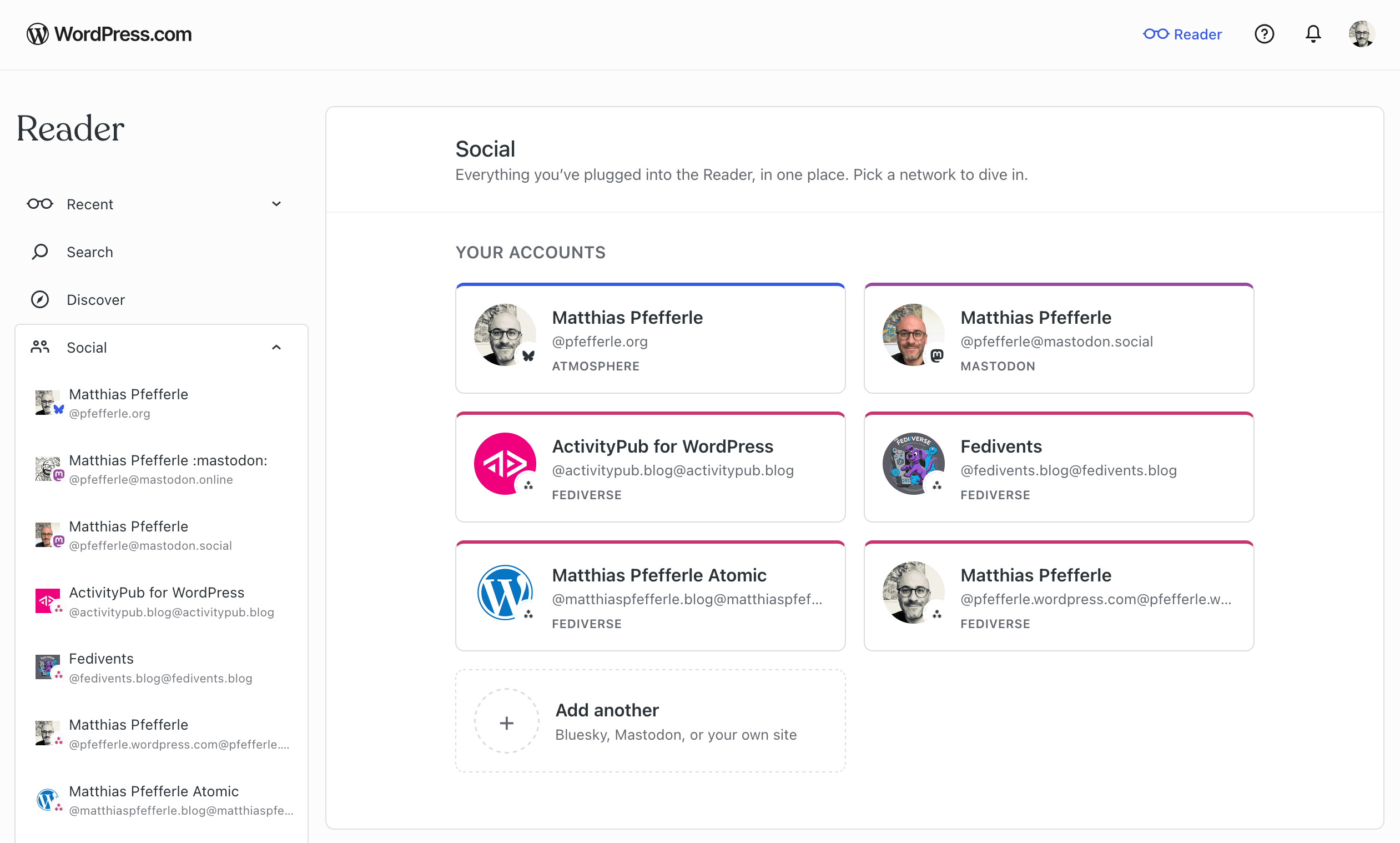
    A screenshot of the Readers new Connection site.

    A full write-up will follow next week on the WordPress.com blog, covering the full experience across all three networks.

    We’ve had a few excursions on this blog lately (Radical Speed Month, ATmosphere 1.0.0), so we want to bring the focus back to ActivityPub and the plugin.

    The plugin’s ActivityPub API now powers its first real production client: the WordPress.com Reader. As a WordPress.com user, you can now read, follow, and post across the Fediverse through your WordPress blog, with every interaction tied to your blog’s own ActivityPub identity, and it all sits next to the rest of your Reader.

    At the moment, this works for WordPress.com and Jetpack-connected sites (Jetpack may take a few more days to roll out fully), with self-hosted blogs coming next. Beyond that, the goal is to support any site that speaks the API. The Reader is the first client we’ve built on it, and what we learn here will also feed into the broader WordPress reading experience.

    Your WordPress site, inside the Reader

    If your WordPress.com site has joined the Fediverse, it shows up in the Reader’s new Social Feeds section automatically, next to any Bluesky or Mastodon accounts you’ve connected.
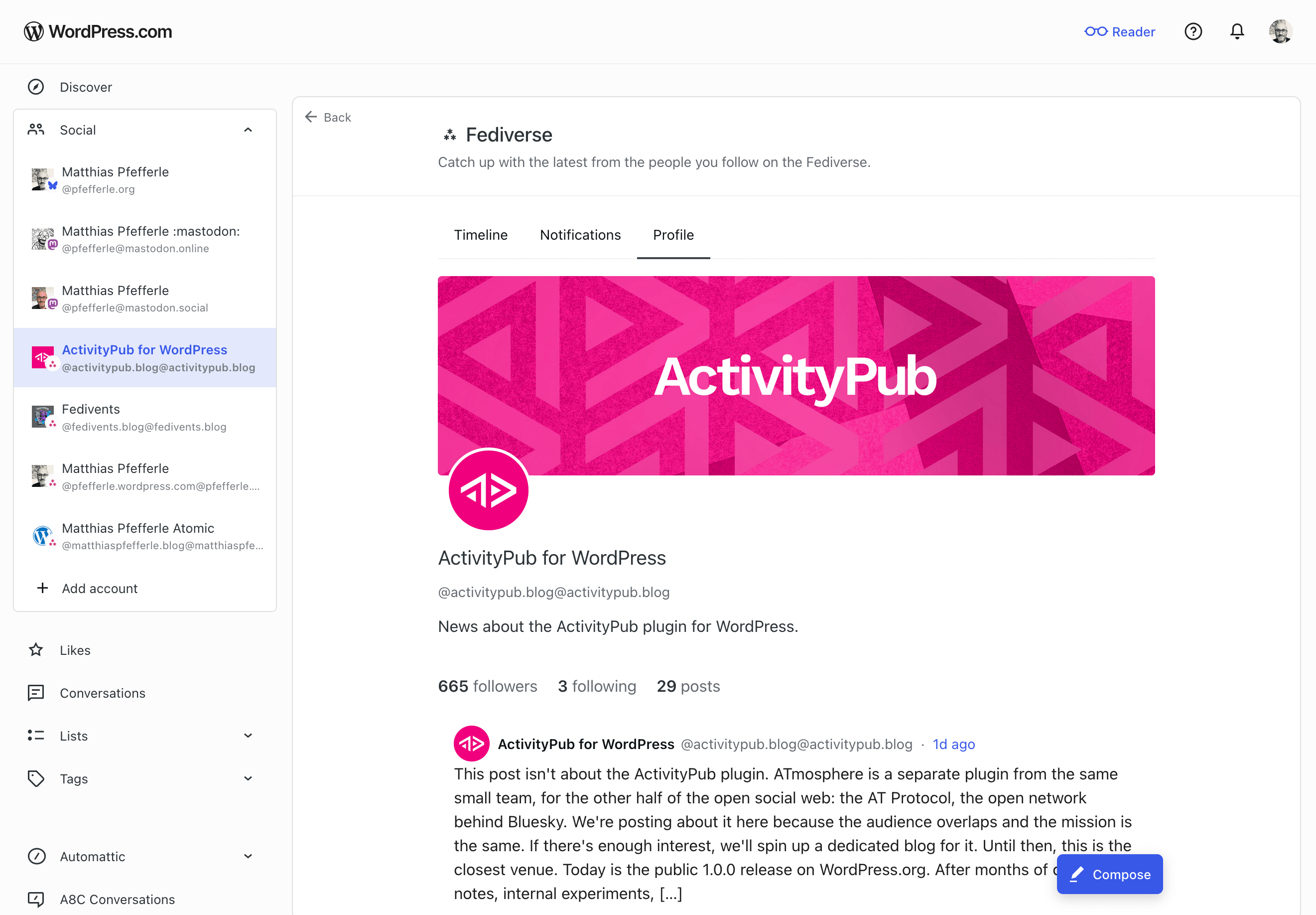
    A screenshot of the Social Profile of the ActivityPub.blog Blog.

    Open it from the sidebar and you’ll land on a dedicated view of your blog’s Fediverse activity. The help center has the full walk-through. Here’s what you can do there:

    • Read posts from accounts your site follows.
    • See your followers and the accounts your site follows back.
    • Follow new Fediverse accounts.
    • Publish short posts. Past the character limit, the composer offers to move your draft to the block editor.
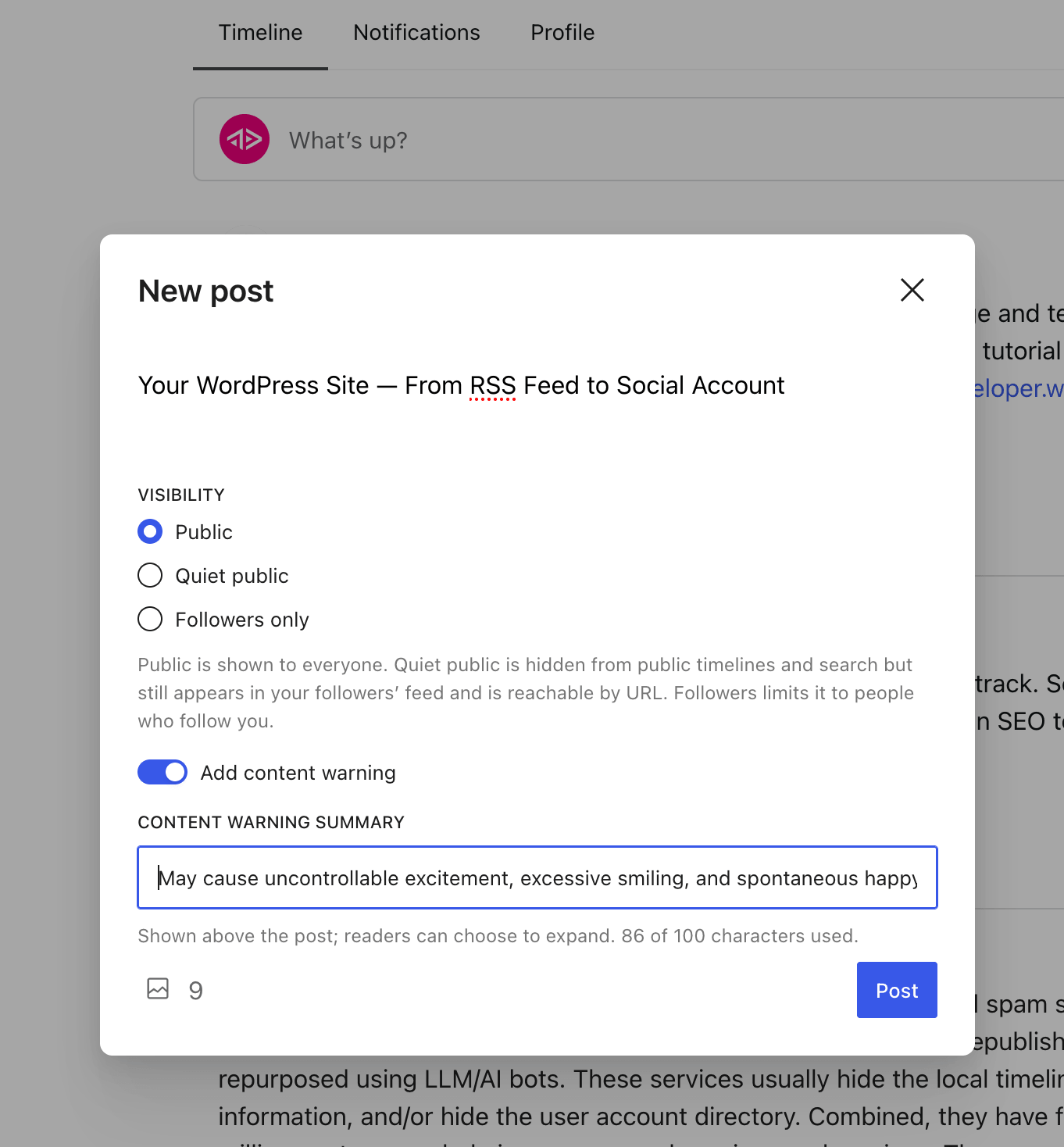
    A screenshot of the "new post" screen inside the Reader.
    • Get notifications when someone follows you, mentions you, replies to a post, likes one, or boosts one.
    • Tap a @mention to open that person’s profile inside the Reader.

    All of this goes through the ActivityPub API on the plugin side. The plugin handles the rest: publishing, signing, federating, receiving. The same machinery your site has always used.

    What’s not in this release yet

    A few things still need work on the plugin or spec side before they land here:

    • Liking, boosting, and replying to other people’s posts. Those land slice by slice over the next releases.
    • Media in posts you publish from the Reader. Text only for now. The block editor stays the place for images.
    • Connecting from a self-hosted WordPress site. For now, the Reader only reaches WordPress.com and Jetpack-connected sites. Self-hosted is next.

    What this means for the plugin

    The plugin’s ActivityPub API has been experimental since 8.1.0. The Reader is the first product to drive it with real users, and that changes two things.

    First, anyone building (or thinking about building) an ActivityPub client now has a real, working server to develop against. The plugin handles publishing, signing, and federation; a third-party client only needs to worry about its own surface. That means more clients become possible, and the people running the plugin get more ways to use their site, beyond the Reader.

    Second, real traffic finds the kind of edge cases test cases never do. Authentication quirks, payload shapes, error paths, the things that only show up at scale. Every bug that comes out of real use is one we can fix, and the plugin becomes more reliable for everyone who runs it.

    The spec evolves, and we follow

    The ActivityPub API in the plugin is still experimental, and the wider spec is still being worked on. The W3C Social Web Community Group and its ActivityPub API task force are addressing the gaps real clients run into. We follow that work and join in where we can help.

    A few topics worth watching:

    • Server-local metadata on foreign objects (activitypub-api#60): how a server can pass on what it knows locally about a post (replies, likes, shares, plus a small “did this caller interact” note) when a client fetches it.
    • Announce side-effects from the client side (activitypub/#512): what the outbox should do to the local shares collection when a client posts an Announce.
    • The baseline profile (SWICG activitypub-api): what a server should tell clients about itself, and what a client should be able to count on.

    If any of these are interesting to you, the discussions are open. Your feedback is welcome.

    Try it

    If your WordPress.com site is Fediverse-enabled, open the Reader and find your site under Social Feeds. Try following someone, or publishing a short note. The full walk-through is in the help center.

    If you run the plugin on a self-hosted site, the same ActivityPub API is available to you, just off by default while it’s experimental. You can turn it on under Settings → ActivityPub, in the Advanced tab. If the Advanced tab isn’t showing, enable it from Screen Options at the top-right of the page first. The Reader doesn’t reach self-hosted sites yet, but once the API is on, any client that speaks it can already talk to your site.

    If something doesn’t work, leave a comment, open an issue on the plugin’s GitHub repository, or reply on the Fediverse. What would you like to see next?

  • ATmosphere 1.0.0 — Liftoff

    This post isn’t about the ActivityPub plugin. ATmosphere is a separate plugin from the same small team, for the other half of the open social web: the AT Protocol, the open network behind Bluesky. We’re posting about it here because the audience overlaps and the mission is the same. If there’s enough interest, we’ll spin up a dedicated blog for it. Until then, this is the closest venue.

    A banner that says: WordPress, part of the open social web.

    Today is the public 1.0.0 release on WordPress.org. After months of design notes, internal experiments, and a stretch of focused work alongside the ActivityPub plugin, ATmosphere has cleared the troposphere.

    What ATmosphere is

    When you publish a post, ATmosphere shares it on Bluesky and stores the full article on your AT Protocol account as a structured record. Bluesky replies, likes, and reposts come back as comments on your WordPress post. Approved comments from logged-in readers go the other way and appear as replies under your original Bluesky post. The same conversation lives in both places without you having to copy anything by hand.

    The bet underneath is bigger than cross-posting. ATmosphere publishes site.standard.* lexicon records, so your blog itself becomes AT Protocol data, not just a link shared on Bluesky. Any compatible app can read the full article from your AT Protocol account, the same way it reads a Bluesky post. WordPress becomes a first-class participant in the network, not a visitor.

    How this differs from a cross-poster

    The first question you may have is: how is this different from Jetpack Social’s Bluesky integration, or from any of the other plugins that share to Bluesky?

    The answer is that they’re solving a different problem. A cross-poster gets your content in front of Bluesky users, which is a real and useful thing. But it’s still a broadcast model. Your WordPress site talks at Bluesky, it doesn’t participate in the protocol.

    In practice that shakes out two ways. First, a cross-posted update creates a copy, not a connection. The post on Bluesky and the post on WordPress are separate records, and nothing in the protocol ties them together. Second, your blog itself has no identity in the network. The cross-poster authenticates as you, the person, and posts on your behalf. Your blog as an entity, with its archive and structure, is invisible to the protocol.

    ATmosphere is built around making your blog itself a participant. Every publish writes two records: an app.bsky.feed.post so the update shows up in Bluesky timelines, and a site.standard.document from the standard.site lexicons that stores the full canonical article on your AT Protocol account. A bskyPostRef link ties the two together. Your blog appears in the network as a publication that other apps and aggregators can discover and read in full, not as a stream of truncated link cards.

    If you want a poster, Jetpack Social is the right tool. If you want your WordPress site to be a place on the AT Protocol, that’s what ATmosphere is for.

    Why a third-party PDS, for now

    There’s a natural follow-up once the model clicks: if my WordPress site is acting as a Bluesky identity, why does Bluesky (or another provider) still need to be in the picture at all? Why not host the data on the site itself?

    We tried that route first. About 90% of a Personal Data Server (the AT Protocol service that holds your signed records and streams them to the network) maps cleanly to PHP and a WordPress database. The remaining 10% is the firehose: a WebSocket stream that pushes every change to the network’s relays in real time. PHP’s request-response model is fundamentally incompatible with persistent connections like that, and typical WordPress hosting environments aren’t designed for always-on background processes either.

    The cleaner mental model turned out to be email. Even when you self-host your mail, you don’t build the mail server as a WordPress plugin. The mail server is its own piece of infrastructure that runs alongside your site. AT Protocol is the same shape. The PDS is infrastructure, not application logic. ActivityPub was designed to be implementable by any HTTP server, which is why it works as a plain WordPress plugin. AT Protocol was designed around always-on data servers, so the natural fit is a hosted PDS running next to WordPress, not inside it.

    For 1.0.0, that means using whichever PDS the user already has. Most people connecting ATmosphere come in with a Bluesky account, so they already have a PDS and a DID, and borrowing that lets us focus on the parts that live on the WordPress side: the publishing pipeline, the long-form rendering, the comment round trip, the domain-as-handle handshake.

    We are still pulling on a thread, though. There’s a version of this where a PDS sits comfortably alongside WordPress, ready to host your records for you, so the AT Protocol side feels just as native to WordPress as the ActivityPub side already does. Nothing to announce yet. We’ll let you know when there’s something to show 😉

    Your domain, your handle

    One of the headline features: your WordPress domain becomes your Bluesky handle. Instead of @you.bsky.social, your handle reads @yourblog.com.

    A screenshot of the handle settings.

    ATmosphere handles the verification side. It serves the right file at /.well-known/atproto-did so Bluesky can confirm the domain really belongs to you. From the settings page, it’s one click. You then open Bluesky, pick Change Handle, choose I have my own domain, enter your site, and you’re done. Same identity model Bluesky uses for its own custom domains, but the technical bit takes care of itself.

    Long posts, done right

    The hardest problem in WordPress-to-Bluesky publishing is what to do with a long article on a 300-character network. ATmosphere gives you three options from the settings page:

    • A link card, the default. A clean preview pointing back to your full post.
    • A single post combining the body text and the permalink, for when the post fits.
    • A two-post teaser thread: a hook, a body chunk, and a “continue reading” reply with the link card. The teaser surfaces reliably on bsky.app profiles, and the terminal post always offers a clear path back to the full article on your site.

    When you edit a threaded post, ATmosphere updates the existing Bluesky posts in place when it can, so links and replies stay connected. If you change the publishing format, ATmosphere replaces the old posts with new ones. And the full article, every paragraph of it, lives on your AT Protocol account regardless of which format you pick, so other AT Protocol-aware apps and readers can render the long version too.

    Two-way conversations

    When someone replies, likes, or reposts your post on Bluesky, ATmosphere checks periodically and turns those reactions into WordPress comments on the matching post. Likes and reposts get their own comment types, so they show up as engagement counts rather than duplicating as text comments.

    Going the other way: when a logged-in reader leaves an approved comment on a cross-posted article, it’s published to Bluesky as a reply under your original post. Edits sync. Unapprove or delete, and the corresponding Bluesky reply comes down too. Anonymous comments, trackbacks, and pingbacks are skipped. Only logged-in readers participate in the round trip.

    A few more things worth knowing

    • Backfill. A built-in tool publishes older posts to AT Protocol on demand, batched to ten at a time so it doesn’t overwhelm your server.
    • Post types. Choose which post types publish to AT Protocol from the settings page. Plugins and themes can opt their own custom post types in with add_post_type_support( 'your_type', 'atmosphere' ).
    • Extensible. New atmosphere_publish_post_result and atmosphere_publish_comment_result actions let other code react to publish success or failure. An atmosphere_should_sync_reply filter lets you suppress specific incoming replies before they become comments.

    Get It

    Download from WordPress.org or grab the source on GitHub.

    A dedicated blog?

    This blog has always been about the ActivityPub plugin, and ATmosphere is a different plugin for a different protocol, so this post is something of a guest appearance. If readers tell us they want ongoing release posts, deep dives, and roadmap notes about ATmosphere too, we’ll spin up a dedicated home for it. For now, follow along here and let us know.

    A huge thank-you to everyone who shaped 1.0.0, especially Brandon Kraft (@kraft) and Ryan Cowles, who carried huge pieces of the onboarding, settings, and publishing work over the last few months. Thanks also to the AT Protocol and Bluesky folks who’ve been generous with their time on the lexicon questions.

    Try it out, point your domain at Bluesky, publish a post, and tell us what you think. What should ATmosphere do next?

  • Radical Speed Month — The Reader Meets the Fediverse

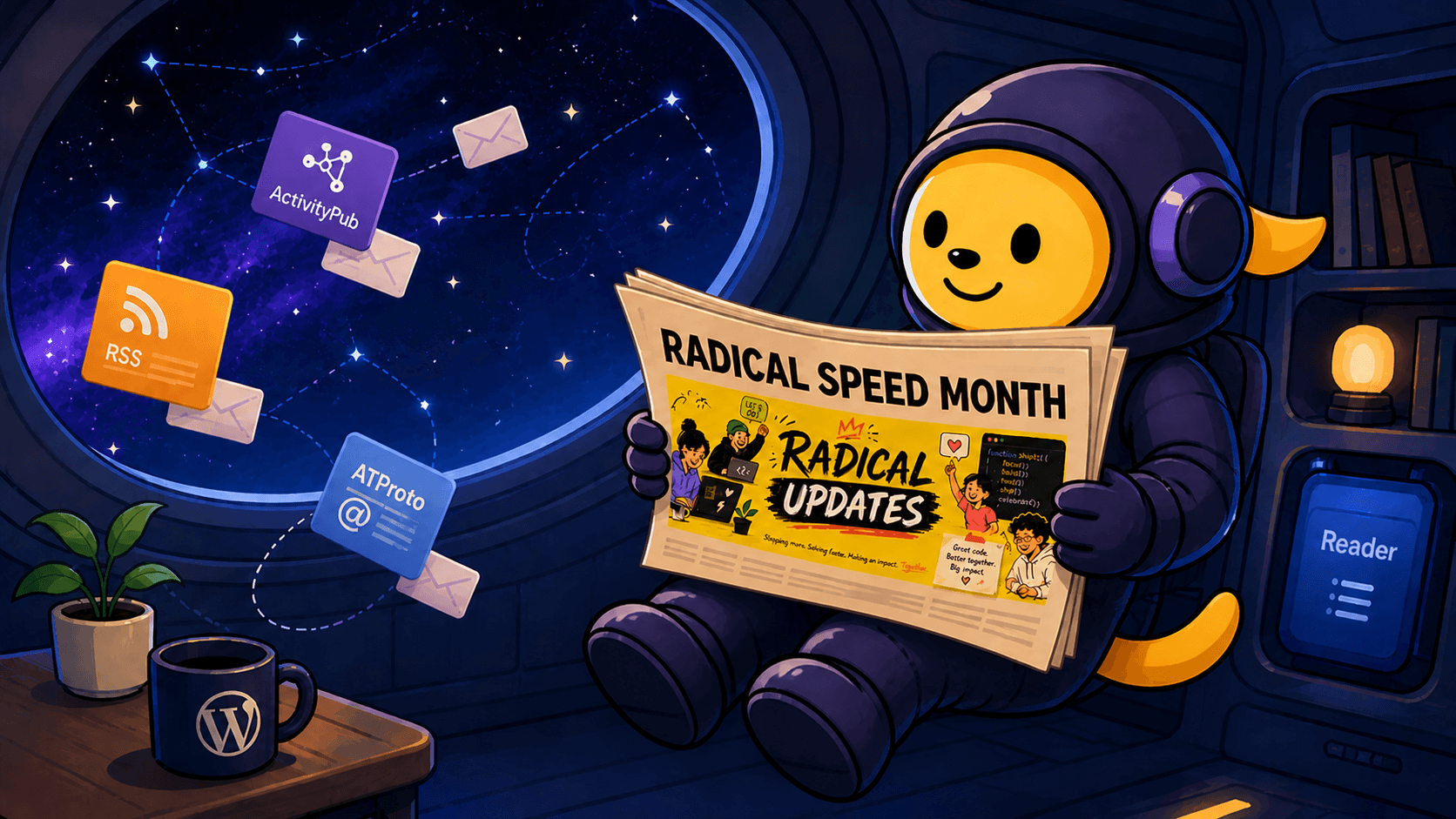
    Wapuu in a space suit floats inside a spaceship, reading a newspaper with a “Radical Speed Month” headline and a yellow update graphic, while message cards for RSS, ActivityPub, and ATProto drift in through a window showing space.

    This post is about work happening on WordPress.com, specifically the Reader, the long-running subscription-and-reading surface that’s been part of WordPress.com since 2008. It’s a sibling effort to the ActivityPub plugin, not a feature of it. We think it matters to plugin readers anyway, because the two pieces are converging, and the converging point is what we’ll be working on next.

    Two weeks ago, Automattic kicked off something internally called Radical Speed Month, a four-week sprint where small teams ship fast on focused projects. We (@jeremy and @pfefferle) took the chance to spend it on something that’s been sitting at the edge of the Fediverse-and-WordPress conversation for a while: making the WordPress.com Reader speak Fediverse.

    Today is roughly the halfway mark, and the picture is clearer than we expected. Here’s what shipped, what’s in flight, and what’s still ahead.

    The thesis

    The Reader on WordPress.com has held a single, useful role for over a decade: it’s where your subscriptions live. Blogs, podcasts, RSS feeds. What it hasn’t done, yet, is read the open social web. Your Mastodon timeline lives in another app. Your Bluesky timeline lives in a third. The Fediverse is out there, and the Reader stays over here.

    The Radical Speed Month bet: ship three protocol adapters in four weeks, and prove the Reader can become a universal aggregator. RSS / Google Reader API (so any reader app can use WordPress.com as a sync backend), ActivityPub (so Mastodon, Pixelfed, and friends show up natively), and ATProto / Bluesky (because that’s where a real chunk of the social-web conversation has gone). One Reader, every protocol you care about.

    If you’ve been following the ActivityPub plugin for a while, you already know one half of this story, your blog speaking out to the Fediverse. The other half is reading in, and that’s where this month’s work concentrates.

    What’s already landed

    Reader as a sync backend

    Any Google Reader-compatible app can now point at WordPress.com and use it as a sync backend. That includes Reeder, NetNewsWire, ReadKit, lire, Unread, Fiery Feeds, Feed Me, and Read You. The auth onboarding is short, and your subscriptions, read state, and stars sync across whichever app you actually like. We’re working on a setup guide that walks through the steps for the most common apps; it should land soon.

    This wasn’t directly Fediverse work, but it’s part of the same idea: the Reader as a backend, not a destination. If your reading habit lives in a different app, that’s fine. Your subscriptions still live on WordPress.com.

    Bluesky timelines, threads, and profiles

    The Bluesky / ATProto adapter has moved further than the original plan suggested.

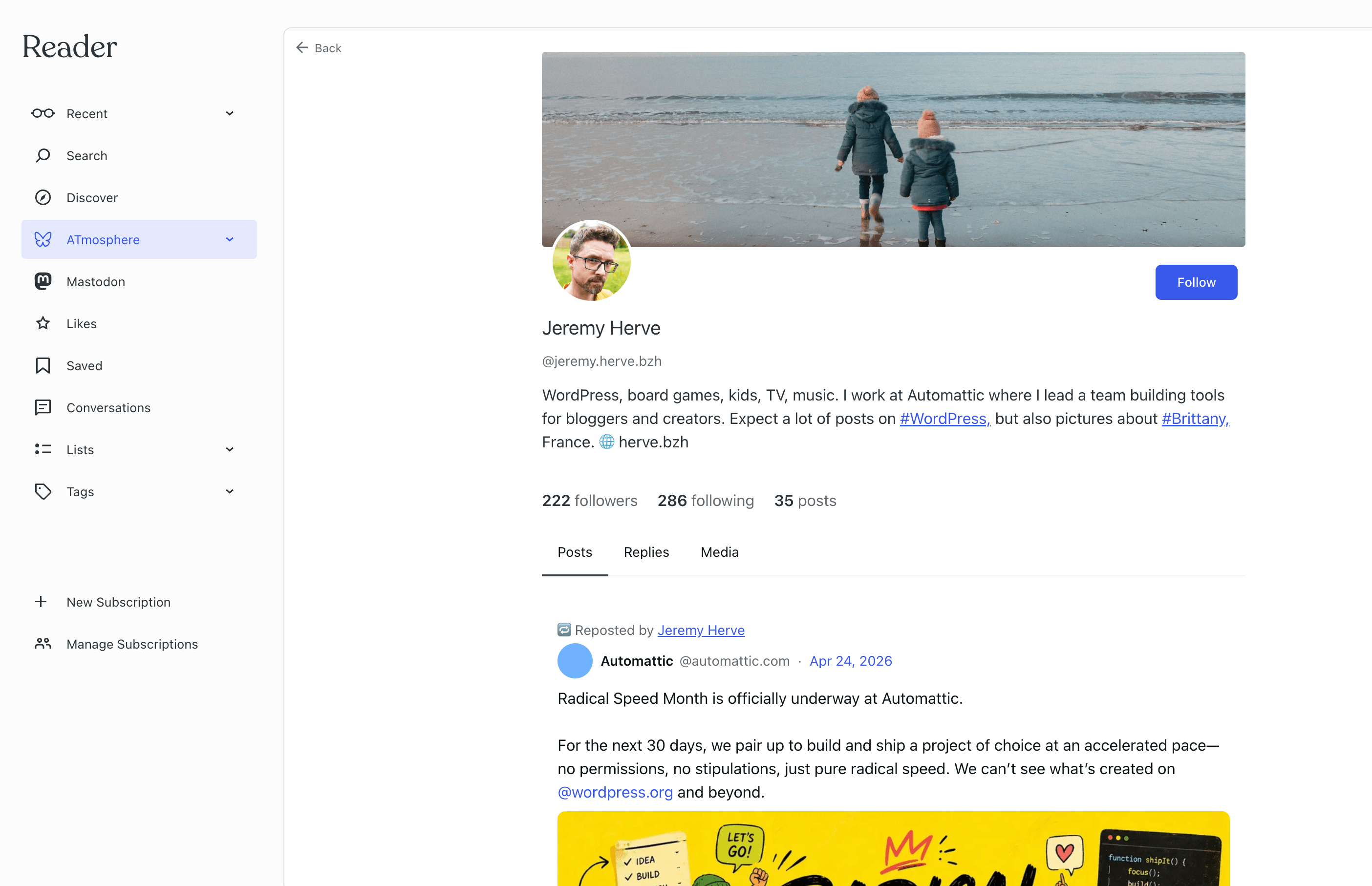
    The image shows Jeremy Herves Bluesky profile in the reader.

    You can:

    • Connect a Bluesky account through the Reader’s connections panel, with a Verify step that confirms the handshake works on both sides.
    • Read your Bluesky home timeline as a tab in the Reader, with native rendering for facets, embeds, and quote posts.
    • Follow links inward, opening a thread in the Reader, viewing an author’s profile, browsing their posts / replies / media filter tabs, following a hashtag.
    • Follow and unfollow Bluesky accounts directly from the profile pages.
    • Like posts, repost posts, and reply to posts. A shared composer for replies is in late review.

    The remaining piece on the Bluesky side is quote-posting and deleting your own posts, which we’re shipping together. After that, Bluesky is a complete first-class tab in the Reader.

    Mastodon, the same shape

    Mastodon followed the same pattern: connect, verify, then a steady cadence of small additions like timeline, in-app threads, author profile and feed (with Posts / Replies / Media filter tabs), and tag and hashtag feeds. All of those are live for Mastodon today.

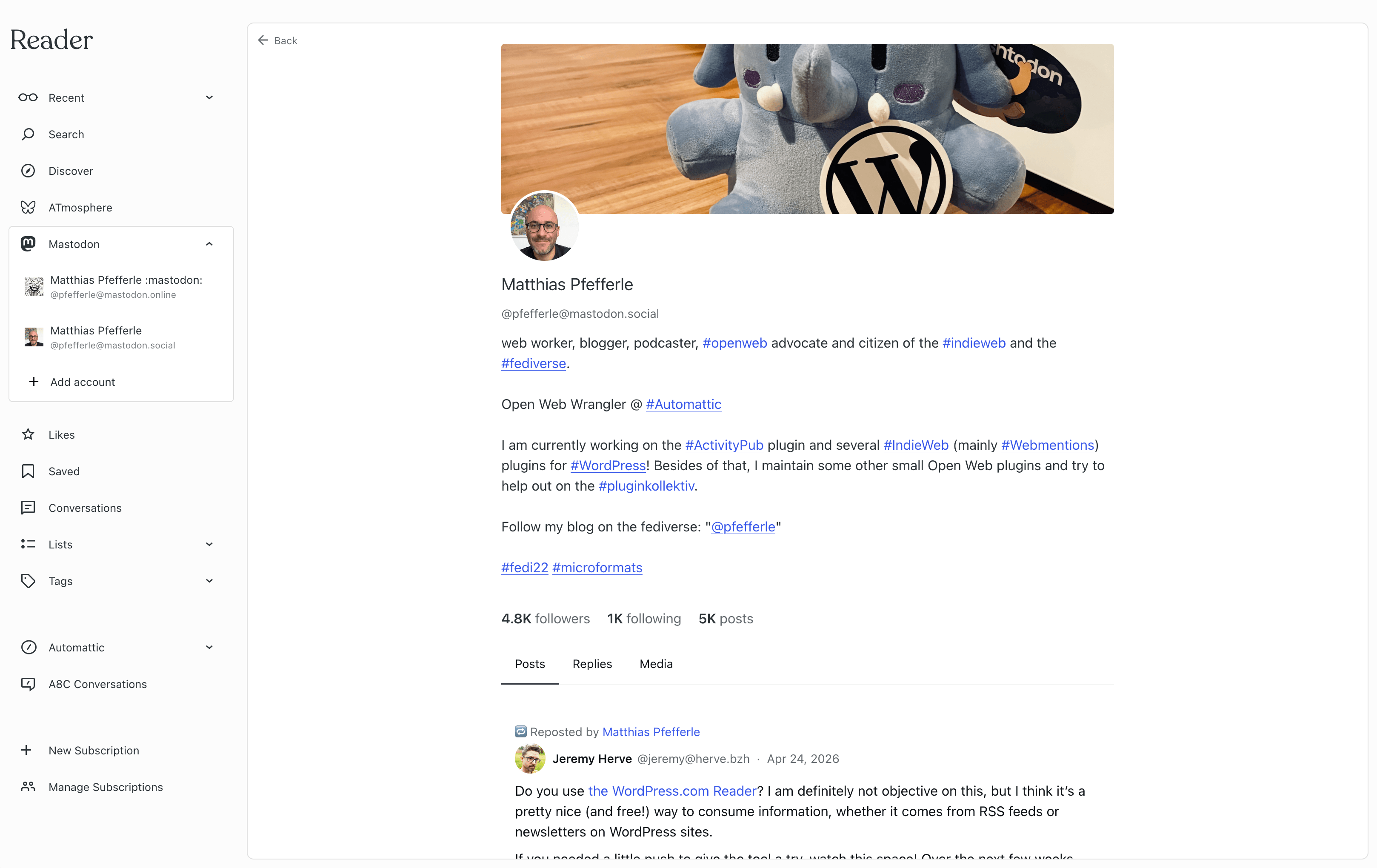
    The image shows Matthias Pfefferles Mastodon profile in the reader.

    What’s still coming on the Mastodon side is the equivalent of the Bluesky interaction work (favourite, boost, reply, quote) built on the same shape that worked for Bluesky. Expect those to land in the second half of this month.

    How this connects to the plugin

    If you read 8.1.0 — By the Numbers, you’ll have noticed a small line in the announcement: the plugin now exposes an ActivityPub API. It’s experimental, behind a feature flag, and lets third-party apps create, edit, and delete posts on your blog the way they would post to a Mastodon account.

    That work isn’t an accident. It’s one half of a bridge, and Radical Speed Month is the other half.

    The Mastodon-in-Reader work that shipped this month is user-level: you connect your Mastodon account once, and the Reader can sync your Mastodon timeline regardless of where your blog lives. That’s a useful starting point, but it’s not the only path forward. The model we’ve been working toward for a year is blog-level: each ActivityPub-enabled WordPress blog as its own social identity inside the Reader, with the plugin providing the actor and the ActivityPub API providing the connection.

    That work is on the schedule for the second half of the month. The radical-speed pace gave us proof first: timelines, threads, profiles, and interactions can all run through one shared pattern, with two networks already validating it. With the pattern in place and the plugin’s ActivityPub API ready to talk to, the blog-level path slots into the same architecture, letting your plugin-enabled blog appear as an ActivityPub identity in the Reader sidebar, with its inbox, its outbox, and its real ActivityPub follow graph. And because the API is part of the ActivityPub standard, the same path works for any Reader or client that speaks it, not just WordPress.com.

    What’s still planned

    A short list of what we’re chasing for the second half of the month and just past it:

    • Quote-posting and delete-your-own-post for both Bluesky and Mastodon, the last pieces of the interaction set.
    • A shared composer that handles replies, quote-posts, and standalone posts across networks. Already in progress on the Bluesky side; Mastodon plugs in next.
    • Disconnect, a clean way to remove a Mastodon or Bluesky connection from the Reader.
    • Blog-level ActivityPub, the design pass and first slices for plugin-enabled blogs as first-class Reader identities. The user-level work proved the pattern; this is where the plugin and the Reader actually meet.
    • Tightening the shared pattern so adding the next network (Threads, Pixelfed, whatever comes after) is incremental work.
    • Wrap-up, a metrics snapshot, an honest retrospective, and the heads-up notes our customer-support folks need before the work goes broad.

    A note on speed

    A month feels short to ship three protocols’ worth of reading, profiles, and interactions. It’s worth saying out loud: this didn’t happen because we worked unsustainable hours. It happened because we sat with the design for months, picked a shape that lets each protocol reuse the same plumbing, and broke the work into pieces small enough that any one was reviewable in a day or two. “Radical speed” turned out to mean: a backlog of careful design, drained quickly.

    What this means for you

    If you run an ActivityPub-enabled WordPress blog, whether on WordPress.com or self-hosted, the practical takeaway is small for now and meaningful soon. The plugin’s ActivityPub API in 8.1.0 is the foundation for your blog showing up as a real social identity inside any Reader or app that speaks the same protocol. The WordPress.com Reader is the first concrete target, but the universality matters: any client that implements the standard can talk to your plugin-enabled blog the same way.

    Already, the work this month means there’s now a Reader on WordPress.com that knows how to read the Fediverse alongside RSS and Bluesky. That’s a meaningful thing to have built, and the bridge from your plugin-enabled blog to that Reader is what the second half of the month is about.

    Tell us what you’d like to see

    We’ll keep posting updates as the month closes out. If you have thoughts on what blog-level ActivityPub in the Reader should look like, what protocols you’d want next, or how the plugin’s ActivityPub API should evolve to make this seamless, leave a comment on the plugin’s GitHub repository or reply on the Fediverse. We read every message.